
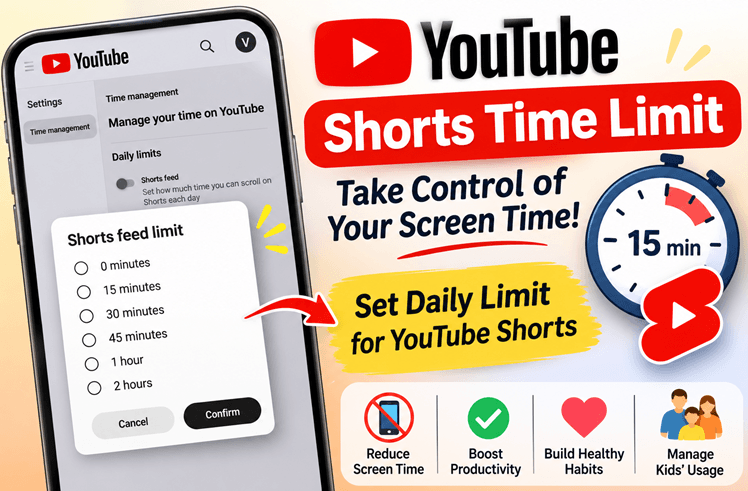
ouTube is making it easier for users to manage their screen time with its Shorts Feed Time Limit feature. This setting allows users to decide how much time they want to spend scrolling through YouTube Shorts each day.
With short-form videos becoming increasingly popular, it is easy to spend more time than planned watching one video after another. YouTube’s new time management option helps users set daily limits and become more mindful of their viewing habits.
What Is YouTube Shorts Feed Time Limit?
The Shorts Feed Time Limit is a feature available under YouTube’s Time management settings.
It allows users to choose a daily time limit for watching Shorts. Once configured, users can set a preferred duration instead of scrolling through Shorts without any specific time restriction.
This feature is particularly useful for people who want to reduce unnecessary screen time, improve productivity, and maintain better digital habits.
Available Daily Time Limits
YouTube provides the following time limit options for the Shorts feed:
| Time Limit | Daily Usage |
|---|---|
| 0 minutes | No Shorts scrolling |
| 15 minutes | 15 minutes per day |
| 30 minutes | 30 minutes per day |
| 45 minutes | 45 minutes per day |
| 1 hour | 60 minutes per day |
| 2 hours | 120 minutes per day |
Users can select the option that best suits their daily routine.
How to Set a Time Limit for YouTube Shorts
Follow these steps to configure the Shorts Feed Time Limit:
Step 1: Open YouTube
Visit YouTube and sign in to your account.
Step 2: Open Settings
Click on your profile and navigate to the Settings section.
Step 3: Select Time Management
Under Settings, click on Time management.
Step 4: Find Daily Limits
Look for the Daily Limits section. Here, you will find the Shorts Feed option with the description:
“Set how much time you can scroll on Shorts each day.”
Step 5: Enable Shorts Feed Limit
Turn on the Shorts Feed setting to configure your preferred daily limit.
Step 6: Choose Your Preferred Time
Select one of the available options:
- 0 minutes
- 15 minutes
- 30 minutes
- 45 minutes
- 1 hour
- 2 hours
Step 7: Confirm Your Selection
After selecting your preferred time limit, click the Confirm button to save your selection.
You have now configured your daily Shorts Feed limit.
Why Is This Feature Useful?
YouTube Shorts can be entertaining and informative, but continuous scrolling can consume a significant amount of time.
This feature can help users:
- Reduce Screen Time: Set a daily limit on Shorts consumption.
- Improve Productivity: Spend less time scrolling and more time on important activities.
- Build Healthy Digital Habits: Become more conscious of daily video consumption.
- Manage Children’s Screen Habits: Help families encourage more balanced use of digital platforms.
Can You Disable YouTube Shorts Using This Feature?
The available settings include a 0-minute option, which allows users to choose a zero-minute Shorts limit.
Users can also select higher limits depending on their preferences.
Conclusion
YouTube’s Shorts Feed Time Limit is a useful addition to its Time Management settings. By offering daily limits ranging from 0 minutes to 2 hours, YouTube gives users more control over their Shorts viewing habits.
If you frequently find yourself spending too much time scrolling through Shorts, consider enabling this setting and choosing a daily limit that works for you.
Take control of your screen time and make your YouTube experience more productive!